Masterless KVM/QEMU orchestrator
Run real VMs across a cluster — from one static binary, with no master node.
Copy one binary to each Linux host. The hosts find each other and replicate state, and you get live migration, automatic failover, snapshots, deduplicated backups, and a web UI — with no external database, no agents, and no control plane to look after.
- ~35 MB static binary
- Linux + KVM/QEMU
- GPL-2.0
The CLI
Start a VM, then move it while it runs.
The session from the recording above, as text. lv reaches any host through an SSH tunnel, or over gRPC with mTLS from a remote workstation.
List the hosts, with the CPU and memory each one has in use and the litevirt version it runs.
lv host ls NAME ADDRESS STATE CPU MEMORY VMs VERSION node-1 10.0.50.11 HOST_ACTIVE 6/64 24576/262144 MiB 2 v1.0.10 node-2 10.0.50.12 HOST_ACTIVE 4/64 16384/262144 MiB 1 v1.0.10 node-3 10.0.50.13 HOST_ACTIVE 0/32 0/131072 MiB 0 v1.0.10Start a VM. No host is named, so placement puts it on node-2.
lv run --name web-01 --image ubuntu-24.04 --cpu 2 --memory 2048 VM web-01 created on node-2 (state: VM_RUNNING)Live-migrate it to node-3. Memory copies across while the VM keeps running, then one 74 ms switchover.
lv migrate web-01 node-3 live-migrating web-01: node-2 → node-3 transferring memory (2048 MiB) ▕████████████████████▏ 100% ✓ migrated — 1 switchover, 74ms downtime · web-01 now on node-3Check where it runs now.
lv ls NAME HOST STATE CPU MEMORY IP web-01 node-3 VM_RUNNING 2 2048 MiB 10.0.50.51
The web UI
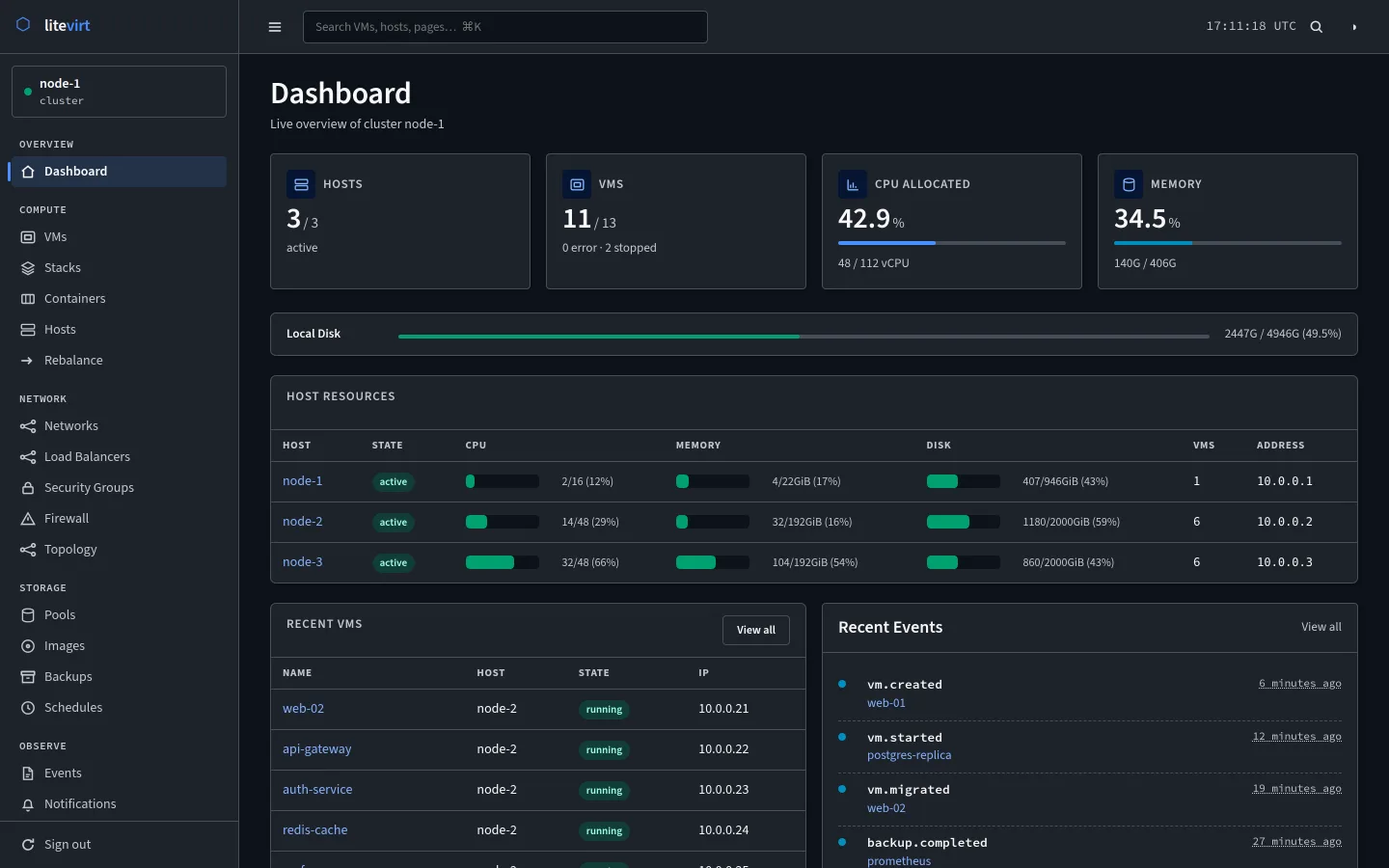
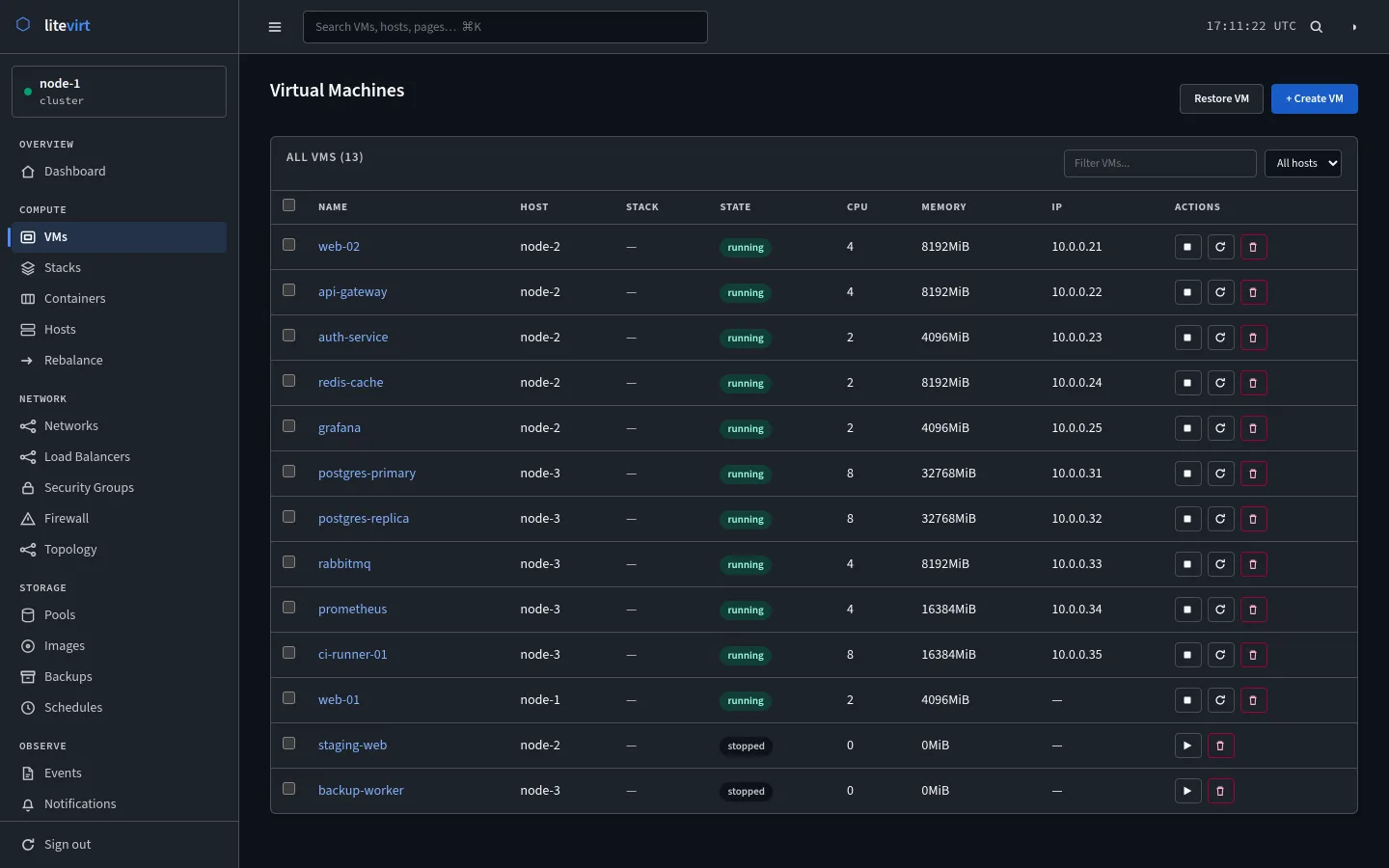
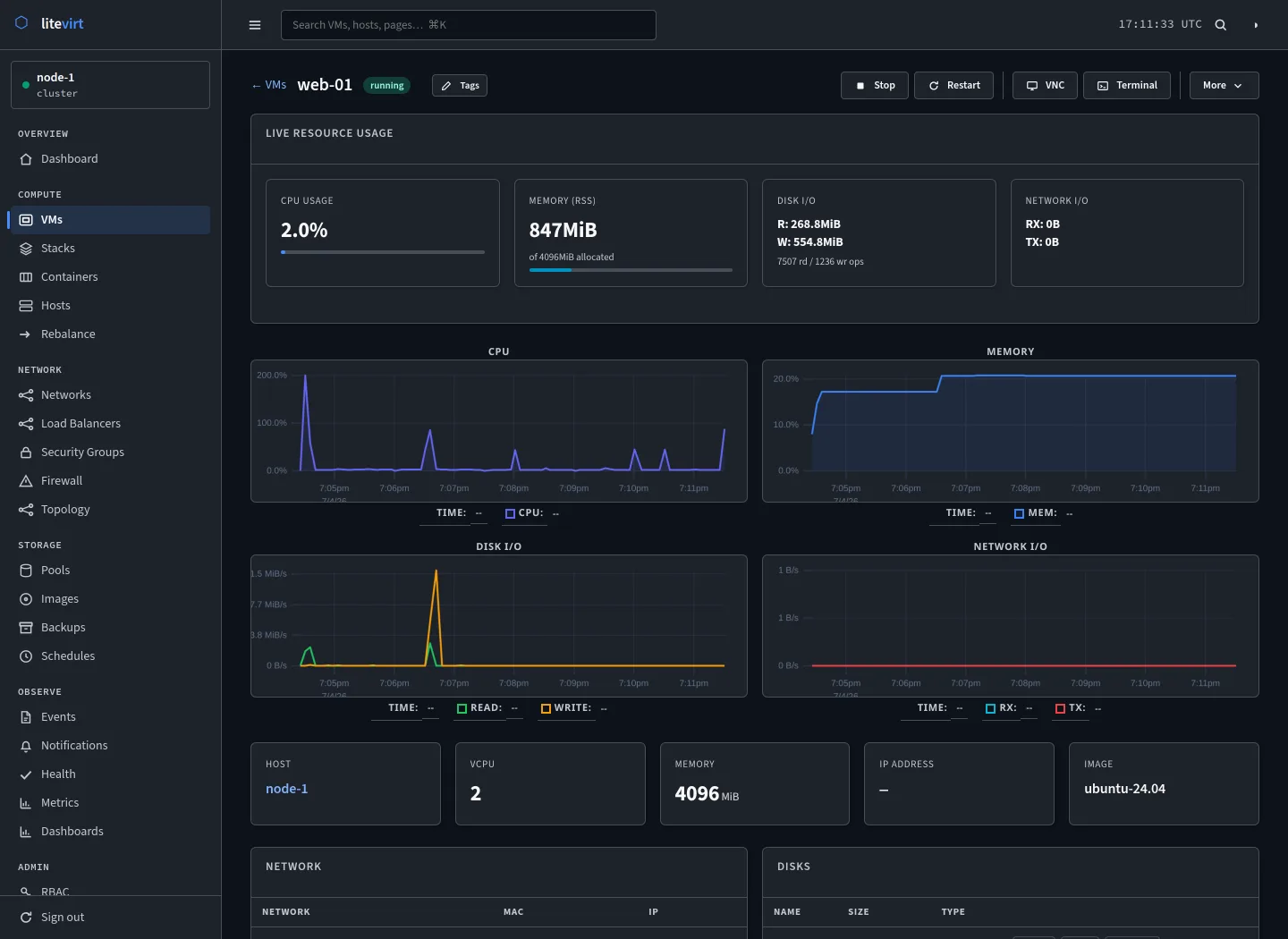
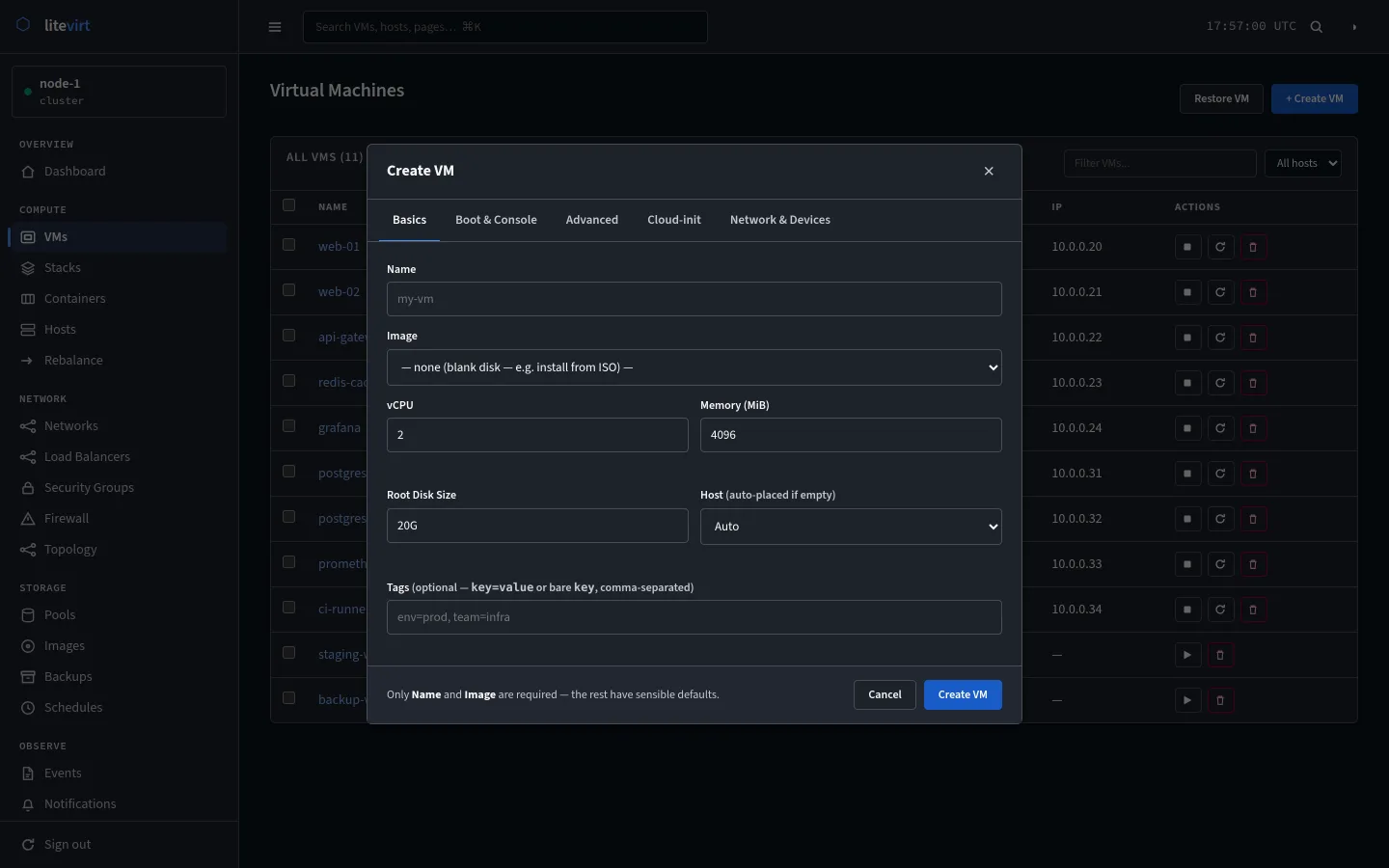
The same cluster, in a browser.
The UI ships inside the binary and every host serves it, built on Go templates and HTMX. Sign in to any node and you see the whole cluster.
What's in the binary
The whole cluster stack, without the add-ons.
No separate backup server, load-balancer appliance, or identity service to install. All of this ships in the same file.
Compute
- Full KVM/QEMU VMs with UEFI, cloud-init, and VNC or SPICE consoles
- Hot-plug disks, NICs, and GPUs into running VMs
- Virtio memory ballooning
- Change CPU, restart policy, and autostart without rebuilding the VM
Networking
- Bridges, VXLAN overlays, isolated networks, and SR-IOV
- Built-in DHCP and DNS, with names like web.shop.lan for every VM
- NAT, SNAT, and host isolation
Resilience
- Live, cold, and storage migration
- Quorum failover with IPMI or watchdog fencing
- Per-VM restart policies, plus a witness host for even-sized clusters
- Self-upgrade that rolls itself back if a host fails to come up
Data
- Disk snapshots, and live snapshots that include RAM
- Deduplicated backups that freeze the guest filesystem first
- Incremental volume replication, promoted when a host is fenced
- Eight storage drivers: local, dir, NFS, iSCSI, Ceph, ZFS, btrfs, LVM-thin
Orchestration
- Compose-style YAML for multi-VM stacks
- Placement policies, anti-affinity, and a live rebalancer
- Layer-4 load balancing with HAProxy and keepalived
- A GitOps reconcile loop, VM templates, and clones
Containers
- LXC and OCI containers with the same lifecycle and Compose support as VMs
- Deduplicated backups, snapshots, and cold migration
- Templates, clones, and relocation when a host is lost
- Shared tenancy quotas, audit chain, and metrics
Security
- mTLS on every connection, from an automatic ECDSA P-256 PKI
- Path-based RBAC with local, OIDC, and LDAP realms
- TOTP and WebAuthn two-factor sign-in
- Scoped API tokens and a tamper-evident audit hash chain
No master node
Every host is equal.
Most clusters keep their state in one place — a database, etcd, a corosync ring — and that place becomes the thing to protect. litevirt spreads state across every host instead, so there is no master to lose, and clusters grow to hundreds of nodes.
Every host holds the whole cluster
State replicates to every node, so the CLI, REST API, and web UI can talk to any of them.
Writes travel through relays
The Crescent protocol fans changes out over a relay-quorum topology. There is no leader to elect.
Conflicts settle row by row
The last write wins on each row's updated_at timestamp, and anti-entropy checks find and repair drift.
Failover waits for quorum
A host that loses quorum is fenced over IPMI or a watchdog before its VMs restart elsewhere. A witness host breaks ties in even-sized clusters.
How it compares
Where litevirt fits.
Against the tools people usually run VMs on. Partial means it can be done, with the caveat noted.
| Capability | litevirt | Proxmox VE | bare libvirt | k8s + KubeVirt |
|---|---|---|---|---|
| Single static binary — no database, no agents | Yes | No | No | No |
| Masterless — no central control plane | Yes | Partialcorosync | n/a | Noetcd |
| Live migration without downtime | Yes | Yes | manual | Yes |
| Automatic failover with fencing | Yes | Yes | No | Yes |
| Compose-style multi-VM YAML | Yes | No | No | PartialCRDs |
| Disk and live (RAM) snapshots | Yes | Yes | Partial | Partial |
| Deduplicated backup and incremental replication | Yes | Yes | No | Partialadd-on |
| GPU and PCI passthrough, with hot-plug | Yes | Yes | manual | Yes |
| mTLS everywhere, RBAC, OIDC/LDAP, and 2FA | Yes | Partial | No | Yes |
| Footprint | ~35 MB | full distro | library | heavy |
Install
A running VM in three steps.
On any Linux machine with KVM. Each extra host takes one more command.
Read the full guideBuild the binary
git clone https://github.com/colonelpanik/litevirt.git
cd litevirt && make build
Start a node
sudo cp bin/litevirt /usr/local/bin/
sudo litevirt host init --local --name node-1
sudo systemctl enable --now litevirt.service
Run a VM
export LV_HOST=[email protected]
lv image pull <cloud-image-url> --name ubuntu
lv run --name my-vm --image ubuntu --cpu 2 --memory 2048